


Display
Your Professional Display Supplier
Founded in 1985, our company has grown into a reliable manufacturer of e-bike components with long experience in design, R&D, and production. We operate two manufacturing bases built to national and European standards and run stable production lines for key systems used in electric bicycles, mini e-scooters, GB e-bikes, and electric motorcycles. Our team includes over 1,100 employees, among them 130 R&D engineers and 64 QC specialists who ensure consistent quality. With advanced testing and inspection equipment, we provide controlled and dependable manufacturing for global customers who require steady supply and strong technical support.


Why choose us
Advanced R&D Capability
Our R&D team holds over 300 patents and covers industrial design, electronics, software, structure, optics, and production engineering.
Certified Quality System
We operate a professional QC team with 64 engineers and the only CNAS-certified lab among Chinese component manufacturers.
OEM/ODM Service
The company provides OEM and ODM services provide tailored engineering and product solutions based on customer requirements, supported by efficient project management.
After-Sale Service
Our team responds within 24 hours and offers reliable technical assistance to secure smooth operation for all partners.
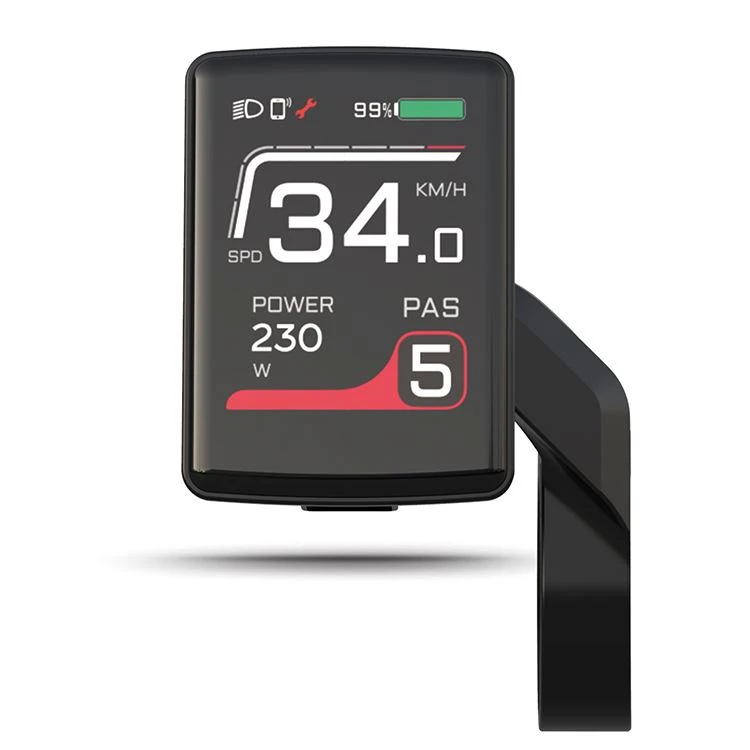
SW102/T
An e-bike display performs a crucial function. The E-bike display is the additional feature that emphasizes the advantages of the integrated technology that distinguishes the machine, even though the motor is the element that defines an electric bike the most. The E-bike display keeps track of the values of all the critical parameters that you need to be aware of when riding. Most people are only familiar with the e-bike speedometer. These include the electricity meter, which displays the instantaneous power output, the pedal assist, the battery capacity, USB charging, and so on.
|
SPECIFICATIONS |
|
|
Dimensions/ Size |
L 70mm W 25m H 42mm |
|
Weight (g) |
31g |
|
Material |
ABS/PA |
|
Operating Temperature |
-20°C ~ 60°C |
|
Core Data |
|
|
Display Type |
1.37"TFT |
|
Nominal Voltage |
DC 24V/36V/48V |
|
Current |
12mA/36V |
|
Mounting Parameters |
|
|
Communication |
UART/CAN |
|
Handlebar for Holding |
Ø 22.2 |
|
Display Information |
PAS level / speed / trip / ODO / light status battery indicator / error alarm / walk etc. |
|
Data Port |
Bluetooth(Optional) |
|
Tests& Certifications |
|
|
Waterproof |
IPX5 |
|
Cerifications |
RoHS/CE |
Features of SW102/T
Power-assist gear
Electric bike usually have multiple power-assist gears, and different power-assist gears can be selected according to different needs.
Mileage Calculation
The LCD display usually records the riding mileage, including single mileage and total mileage.
Power display
The power display of the electric bicycle can provide real-time information on the battery level, letting you know when it needs to be charged.
Speed calculation
LCD display can display information such as current vehicle speed and average speed.
Time display
The LCD display of the electric bike usually displays the current time, as well as information such as riding time.
Light Control
The LCD display of many electric bike can also control the switch and brightness of the front and rear lights.
Temperature display
The LCD display of some electric bicycles can also display the temperature of the battery and motor to protect the battery and motor.
Fault prompt
If the electric bicycle fails, the LCD display will display the corresponding error code and prompt information to let the user know how to solve the problem.
Safety: By furnishing accurate speed and gear information, they mitigate the risk of accidents, thereby enhancing ride safety.
Efficiency: Features such as mileage tracking and battery status indications ensure optimal utilization of your e-bike's capabilities, elevating its performance.
Convenience: The availability of real-time data at your fingertips obviates guesswork, rendering your journeys more straightforward and enjoyable.
Customization: Certain displays offer customization options, allowing riders to tailor settings in accordance with their preferences and riding styles.
Types of SW102/T
Minimalist LED Indicators
Simple light bars or button pads that show battery level and assist mode only. No speed or distance. Cheap, tough, and great for riders who want a clean cockpit.
Standard LCD Screens (Monochrome)
Most common setup. Black and white screen with speed, battery, assist level, trip, and odometer. Backlit, easy to read, and affordable. Ideal for commuters and casual riders.
Advanced Color Displays
Larger color LCD or TFT with rich data like power in watts, cadence, full ride stats, and sometimes GPS maps. Often Bluetooth app support.
Smartphone-Based Systems
Your phone becomes the screen via a handlebar remote or mount and an app. Big display, navigation, music, and fitness tracking.
Applications of SW102/T
Urban Commuting
Facilitates efficient navigation through city streets while monitoring battery usage and remaining range.
Recreational Riding
Enhances recreational e-bike experiences by providing detailed ride metrics and performance feedback.
Delivery and Logistics
Optimizes delivery routes and efficiency for e-bike couriers and logistics services with integrated navigation and real-time data monitoring.
Working Principle of SW102/T
An electric bicycle LCD display connects to the bike’s controller and sensors, gathering data from components such as the motor, battery, and pedal-assist system. This data is processed and visually presented on the display, allowing riders to track their ride performance instantly. Advanced electric bicycle LCD displays even allow control over assist modes, lighting, and other functions directly from the screen.
HOW TO USE THE E-BIKE LCD DISPLAY
TURN ON THE BIKE
The first step to using an e-bike LCD is to turn on the bike. Depending on the model of the bike, there may be two ways to turn it on: by pressing the power button on the battery or by pressing the power button on the LCD. If the power button is on the battery, locate the battery on the bike frame and press the power button to turn it on. If the power button is on the LCD, press and hold the power button until the display turns on.
ADJUST THE ASSISTANCE LEVEL
Once the bike is turned on, you can adjust the assistance level using the buttons on the LCD. Most e-bikes have several assistance levels, ranging from low to high. The assistance level determines how much electric power is used to help you pedal the bike. The higher the assistance level, the easier it is to pedal, and the more electric power is used. To adjust the assistance level, locate the buttons on the LCD.
START PEDALING
After adjusting the assistance level, it's time to start pedaling. The e-bike's electric motor is activated when you pedal, providing additional power to help you ride the bike more efficiently. As you pedal, the LCD will show your speed, distance traveled, battery life, and other essential metrics.
MONITOR THE DISPLAY
While riding the e-bike, it is essential to monitor the LCD to ensure that you maintain a safe speed and that the battery life is sufficient for your ride. The LCD provides valuable information to help you make informed decisions about your ride.
TURN OFF THE BIKE
After completing your ride, it's time to turn off the e-bike. To turn off the e-bike, you need to follow some simple steps. If the power button is on the LCD, press and hold the power button for a few seconds until the display turns off. If the power button is on the battery, locate the button on the battery, and press it to turn off the e-bike. These simple steps will ensure you get the most out of your e-bike LCD and improve your riding experience.
Come to a Complete Stop: Never try to do a reset or mess with your display settings while the bike is moving.
Power Down Completely: Use the main power button to turn the entire e-bike system off.
Disconnect the Battery (Recommended): For any hard reset, we strongly suggest disconnecting the battery from the frame. This makes sure no electrical current is flowing, creating the safest possible environment for the parts.
Check Your Manual: Your bike's user manual is the best source for your specific model. Keep it handy as a reference.

Power Off the E-Bike
The e-bike must be turned off before you commence the reset. This is important to prevent any issues from occurring.
Disconnect the Battery
This is the simplest method of resetting an electric bike display. All you have to do is remove or unplug the battery for 1-2 minutes to reset the system.
Hold the Power Button
Holding the power button down for a while can also help when it comes to how to reset e-bike display. Press and hold the power button for 10-15 seconds to drain any power left.
Reconnect the Battery and Restart
Securely reconnect the battery and turn on the display. At this point, your e-bike display should start working fine.
Check and Reconfigure Settings
Adjust display settings like assist level, and units (km/h or mph).
Display Troubleshooting
Check All Physical Connections
This is a critical step. An ebike display can't work if it's not getting power and data. Carefully trace the wire from the back of your ebike display down to where it connects to the main wiring harness. Unplug it, check the pins for any dirt, moisture, or damage, and plug it back in firmly. Do the same for the connections at the controller and the battery mount.
Check Battery Health
A failing battery can cause all sorts of strange electronic behavior. Make sure your battery is fully charged. If your ebike display only works sometimes or cuts out under load (like going up a hill), it could be a sign that the Battery Management System (BMS) is cutting power. Try testing with a different, known-good battery if possible.
Look at the Controller
The controller is the brain of your e-bike. If it's not working right, it can send bad data to the electric bike display or no data at all. Check that the controller's connections are secure and that the unit shows no signs of physical damage or water damage.
FAQ
As one of the leading display manufacturers and suppliers in China, we warmly welcome you to wholesale cheap display from our factory. All custom made products are with high quality and competitive price.